
You're still SSHing into tmux to run your agents?
It works. Then Wi-Fi drops mid-run and you're guessing whether the detach was clean, three agents means three panes and a window-switching habit, and moving to a second device means hunting for the right session. Fine for one agent; for a fleet it's a daily tax. There's a quieter cost underneath, too: each agent runs as you, reaching your keys and files with no record of what it touched. Here's where the tmux-and-SSH setup runs out of road, and what to put in its place on the same box.
The setup everyone starts with
You bought a Mac mini, or you have a Linux box in the closet, and you want agents working while you sleep. So you do the obvious thing.
ssh you@mac-mini
tmux new -s claude
# start an agent, detach, ssh back in later to check on it
One pane per agent. You detach, you reconnect from your laptop, you scroll up to see what happened. For one agent on one repo, this is genuinely fine. Don't let anyone tell you otherwise.
The trouble starts when there are three of them.
Where it breaks
Every agent in that setup runs as you, on your box, with your everything. That's the whole problem, and it shows up in five places.
- No isolation. Each agent can read your SSH keys, your
.envfiles, your other repos, and your shell history. One prompt injection or one confused tool call, and the blast radius is your entire machine. tmux draws a box around a terminal, not around what runs inside it. - No audit trail. When something writes to
~/.aws/credentials, you cannot point to which agent did it or when. Scrollback isn't a record. It ages out, and it never covered the file system anyway. - No real fleet view. Three agents means three panes and a window-switching habit. There's no single place that shows what's running, what's stuck, and what's burning tokens.
- Reconnect roulette. Wi-Fi drops, the SSH session dies, and you're guessing whether the detach was clean. Move to a second device and you're hunting for the right session name.
- No clean teardown. When a job is done, "cleanup" is you remembering what it touched. There's no command that removes an agent and everything it created.
None of these are tmux's fault. tmux is a terminal multiplexer doing exactly its job. It was never meant to be the security boundary for an autonomous process with your credentials.
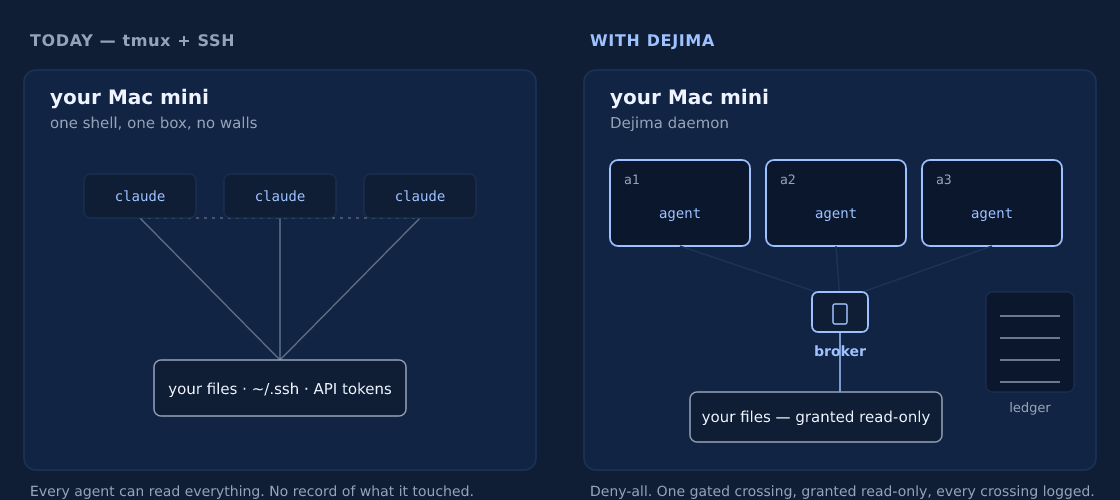
Text version
TODAY — tmux + SSH                WITH DEJIMA
your Mac mini                     your Mac mini
  claude  claude  claude            [a1 agent] [a2 agent] [a3 agent]   sealed
     \      |      /                       \      |      /
      open reach to:                        one broker gate
   your files · ~/.ssh · tokens          your files (read-only) → ledger

Every agent reads everything.     Deny-all. One gated crossing,
No record of what it touched.     granted read-only, every crossing logged.
The fix: same instinct, contained
You don't have to give up the part that works. You still own the hardware, you still reach it over your own network, you still have agents running while you're away. What changes is the box your agents run in.
Dejima puts each project in its own container it calls an island. The island can't see your host files. It can't see the other islands. Host access is off by default, and you grant folders one at a time, read-only, through a broker that writes every crossing to a tamper-evident log. Same Mac mini. Walls added.
The wall is around the project, not around each agent. Run several agents on one project and they share that island: its home directory, its credentials, its network. They each get their own git worktree, so they don't collide on the code, but an agent in an island can reach anything else in that island. If you want two pieces of work walled off from each other, give them two islands.
# on the Mac mini, once
curl -fsSL https://dejima.tech/install.sh | bash

# spin up an island from a repo (it seeds the first agent for you)
dejima init --repo git@github.com:you/web.git

# add a second agent in the same island
dejima agent add web --type codex

# run it: the TUI shows every island and agent in one place
dejima
From there you attach with dejima connect web, and the session survives a dropped connection and follows you to a second device. The same install offers to set up Docker and Tailscale and registers the background service, so "set up the infrastructure" isn't a project you do first.
Now walk back through the five failures:
- Isolation: an agent sees its own island and nothing else. Your keys and your other projects aren't reachable from inside it. Agents sharing an island can see each other, so the boundary to plan around is the project.
- Audit: every brokered file crossing is hash-chained and verifiable with
dejima audit --verify. You can prove what an agent touched, not guess. - Fleet view: the TUI lists every island and agent with status, memory, and logs, and you start, stop, or steer any of them from one screen.
- Sessions: persistent and multi-attach by design. Disconnect, sleep the laptop, pick up on your phone.
- Teardown:
dejima purge webdestroys the island and its volumes. Nothing left behind to find.
The honest version: if you run exactly one agent on one repo and never touch anything sensitive, tmux is fine and you don't need this. The moment you're running a fleet, or the code is under NDA, or you'd have to answer "what did it do," the box matters.
It's the same hardware and the same habit of reaching into your own machine. The agents just stop being able to wander.
Common questions
What's wrong with running agents in tmux over SSH?
tmux draws a box around a terminal, not around what runs in it. Each agent runs as you, with access to your keys, every repo, and your shell history, and nothing records what it touched. For one agent it's fine; for several it leaves you no isolation and no audit trail.
How do I move from tmux to Dejima?
Install Dejima on the same box, point an island at your repo, and add your agent. You still own the hardware and reach it the same way, but your agents now run in a sealed container per project, with brokered host access and a dashboard. The walkthrough prompt below guides you through it.
Have an AI walk you through it
Paste this into your own AI and it'll guide you through moving off tmux, adapted to your setup.
Install Dejima and run your first island →
Next: Turn a Mac mini into an AI agent server in minutes · All guides